Introduction
In traditional data analysis, the analyst is usually tasked with “cleaning” the datasets and bringing them into a suitable format for analysis. This approach implies that the data already exists, consolidated in a single file. However, that is not always the case. The problem with analysing a static dataset is that it does not account for any new values that are recorded over time. In that scenario, we would need to retrieve the new data and re-run the analysis using R or whatever tool we are working with. As one might expect, this is unproductive, though when it only happens a few times a year it may not pose a particular problem.
Where the inefficiency of this approach becomes apparent is when there is a continuous stream of data, meaning the update cycle must be repeated on a daily basis. In these cases, the value of an API becomes clear, as it provides us with the latest values with relatively little effort. In addition, using an API makes it easier to incorporate new data, so if we are building a predictive model its accuracy will remain at a reliable level. Finally, APIs are also valuable in Shiny Apps or web applications more broadly, allowing data analysis to be automated and ensuring that the information presented to visitors remains up to date.
There are a great many APIs from which we can draw useful information. For more details on the availability of free APIs, you can browse a relevant list of them. In this article we will focus on the open data of Greece, made available through data.gov.gr.
Requesting an API Key
The Greek API (like most APIs) requires us to register on the platform. We submit a request on the corresponding page and fill in our details in all fields of the form, as shown below:
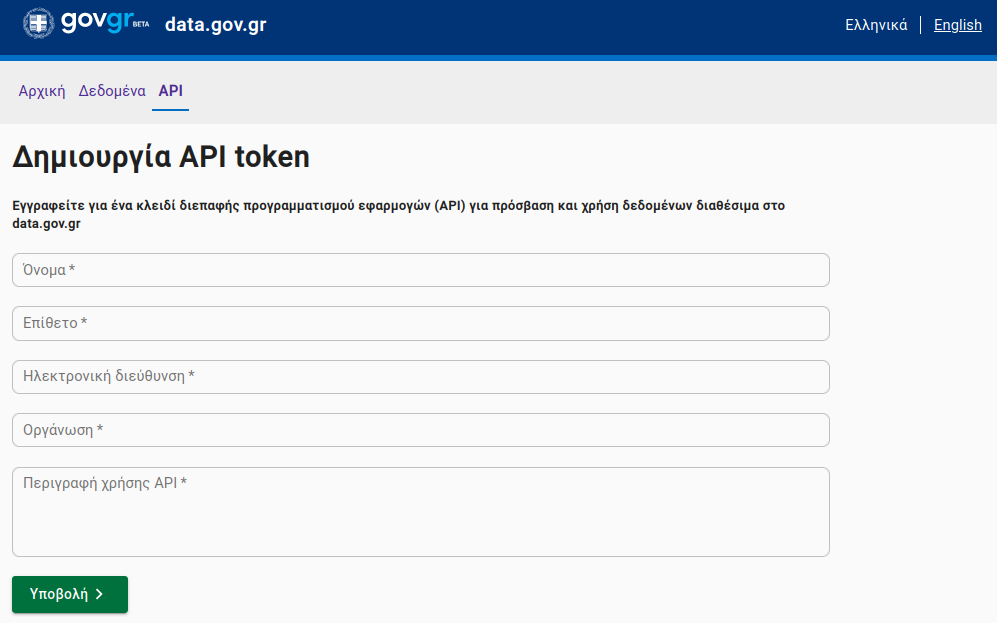
After submitting, you should check your email, as a message will be sent containing a Token that grants access to the API. Make sure to also check your Spam folder. It is worth noting that if you lose the token or have deleted the message, you can submit a new request, even using the same email address, and the system will send it to you again.
Using the API
Once we have the Token, we need to use it to retrieve the data. On this particular platform there are two ways to do so.
- Using the API through the website
- Using the API with R
The first approach (and arguably the less efficient one) is to request the data directly from the data.gov.gr website. While this is straightforward, the downside is that we download a fixed snapshot of the data, meaning that if we want to update it with the most recent values we will need to download it again. Below, we walk through a real example of using the API with R. It is worth noting that the platform itself implicitly encourages this approach, as it provides examples in other popular programming languages (Python and JavaScript).
Example
Before wrapping up this article, we felt it was important to include a practical example. At the time of writing, there are a total of 49 datasets available to choose from. To highlight the benefits of using an API, we will select one that is updated fairly frequently. One such dataset is the one tracking passengers who travel by ferry.
First, we store the base URL of the dataset in a variable. For this particular dataset, ferry passenger traffic, the URL is:
base = "https://data.gov.gr/api/v1/query/sailing_traffic"Next, as the platform’s documentation specifies, we need to define the date range we are interested in. It is worth noting that you cannot retrieve a large date range with a single API call. The ferry traffic data goes back to 2017 and is available up to the present day (2023). For this example, we will request data for the first four days of July 2023.
date_from = "2023-07-01"
date_to = "2023-07-04"

API_URL = paste0(base, "?date_from=", date_from, "&", "date_to=", date_to)

call = httr::GET(url = API_URL,
    add_headers(`Authorization` = paste0('Token token_id')
    )
)
Where token_id should be replaced with the token sent to you by data.gov.gr. After making the GET request and waiting for the response, we receive a list containing various pieces of information. We are interested in the data itself, which we can find under the content field of the list. However, we notice that the values are not human-readable, as they are returned in hexadecimal format.
data = base::rawToChar(call$content)With the command above we convert the raw bytes into readable characters. The next step is to transform the result into a tabular format so that we can analyse it.
#data = jsonlite::fromJSON(data, flatten = TRUE)Finally, using the jsonlite package, we obtain a data frame named data that contains all destinations, passenger counts, and vehicle counts for each day we requested.
Acknowledgements
Photo by Christopher Kuszajewski from Pixabay